
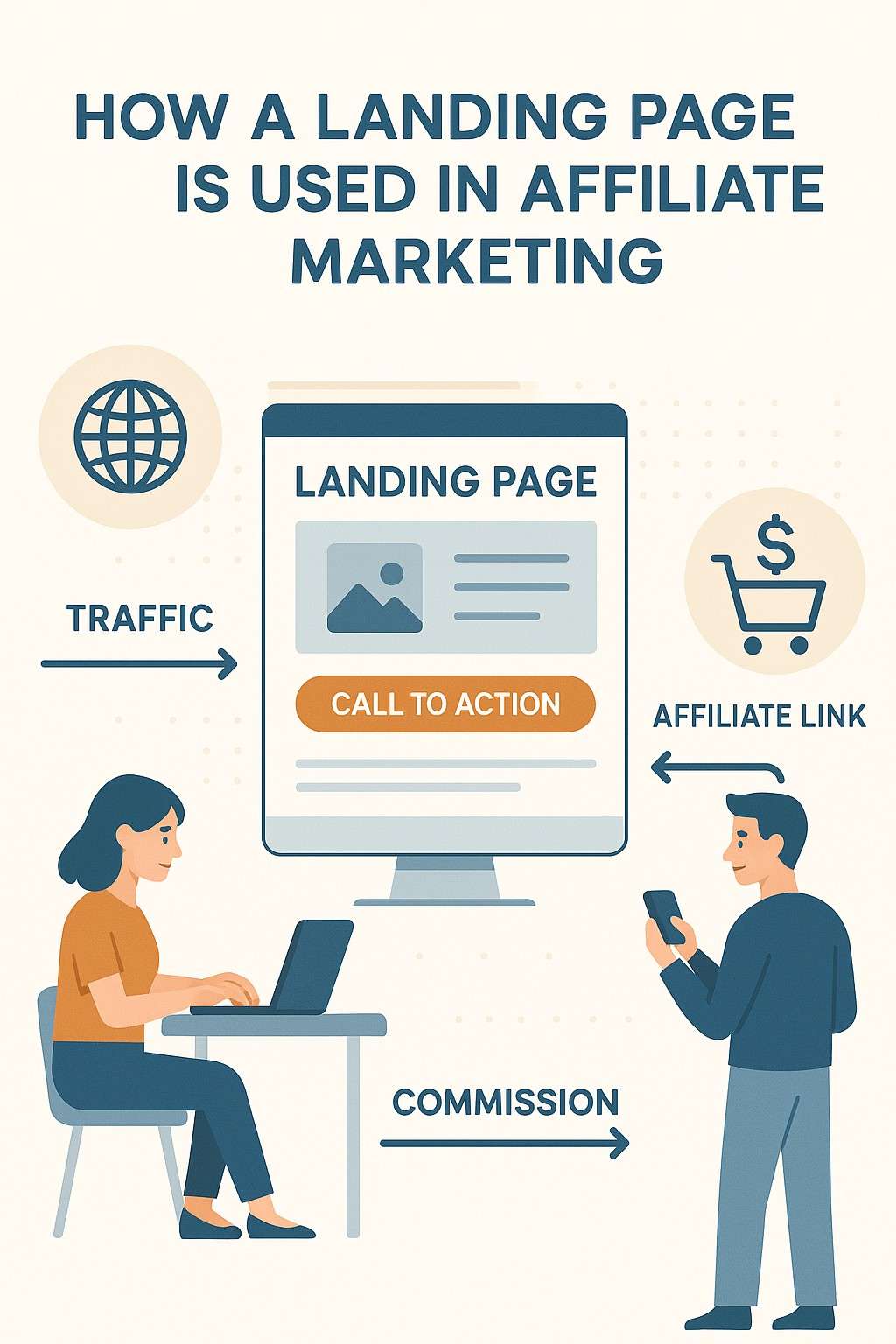
In the realm of digital marketing, a landing page is a standalone web page designed with a specific goal in mind, typically to convert visitors into leads or customers. In affiliate marketing, landing pages play a critical role in bridging the gap between promotional efforts and conversions, guiding potential customers toward taking desired actions, such as clicking an affiliate link, signing up for a service, or making a purchase. Unlike a website’s homepage, which serves multiple purposes, a landing page is laser-focused, optimized to maximize conversions for a single campaign or offer. This essay explores the concept of landing pages, their structure, their strategic use in affiliate marketing, and their benefits and challenges, followed by a practical example to illustrate their application in 2025.
Understanding Landing Pages
A landing page is a web page that visitors “land” on after clicking a link from an advertisement, social media post, email, or other promotional content. Its primary purpose is to encourage a specific action, known as a conversion, which could include:
- Purchasing a product or service.
- Signing up for a newsletter or free trial.
- Filling out a form to generate a lead.
- Clicking through to an affiliate offer.
Landing pages are distinct from other web pages due to their singular focus and minimal distractions. They typically avoid navigation menus, sidebars, or unrelated links that might divert visitors from the intended action. In affiliate marketing, landing pages are often used as an intermediary step to pre-sell or warm up visitors before directing them to a merchant’s site via an affiliate link.
Key Elements of a Landing Page
An effective landing page includes:
- Compelling Headline: Grabs attention and clearly states the offer’s value (e.g., “Discover the Best Budget Laptops for Students in 2025”).
- Engaging Content: Provides concise, persuasive copy highlighting benefits, features, or solutions to the visitor’s problem.
- Strong Call-to-Action (CTA): Encourages action with clear buttons or links (e.g., “Shop Now,” “Get Your Free Trial”).
- Visuals: Images, videos, or infographics that support the offer and enhance appeal.
- Trust Signals: Testimonials, reviews, or trust badges to build credibility.
- Form (Optional): For lead generation, capturing email addresses or contact details.
- Minimal Distractions: No navigation bars or unrelated links to keep focus on the CTA.
- Mobile Optimization: Ensures usability on smartphones, critical in 2025 with mobile traffic dominating.
Types of Landing Pages in Affiliate Marketing
- Pre-Sell Pages: Educate or persuade visitors about a product before linking to the merchant’s site (e.g., a review of a software tool).
- Lead Capture Pages: Collect visitor information (e.g., emails) in exchange for a lead magnet, like an eBook, before promoting affiliate offers.
- Bridge Pages: Transition visitors from an ad or social post to an affiliate offer, adding value through content or bonuses.
- Click-Through Pages: Direct visitors to the merchant’s site via an affiliate link with minimal content, often used in paid ad campaigns.
How Landing Pages Are Used in Affiliate Marketing
In affiliate marketing, landing pages serve as a strategic tool to increase conversions, build trust, and comply with affiliate program rules. They are particularly valuable when affiliates cannot directly link to merchant sites (e.g., in paid ads for Amazon Associates) or want to pre-qualify traffic to improve conversion rates. Here’s how landing pages are used effectively:
1. Pre-Selling the Offer
Affiliates use landing pages to warm up visitors by providing valuable information, such as product reviews, comparisons, or tutorials, before directing them to the merchant’s site. This pre-selling builds trust and increases the likelihood of a conversion.
- Example: A landing page reviewing “The Top 5 VPNs for Streaming in 2025” might compare features, pricing, and user experiences, with affiliate links to NordVPN or Surfshark.
- Benefit: Educated visitors are more likely to convert, boosting commissions.
- Tool: Use page builders like Elementor (free/$59/year) or Leadpages (~$37/month) to create professional pre-sell pages.
2. Capturing Leads
Lead capture landing pages collect visitor information, typically email addresses, in exchange for a free resource (e.g., an eBook, checklist, or webinar). Affiliates then nurture these leads via email marketing, promoting affiliate products over time.
- Example: A landing page offering a “Free Guide to Budget Travel in 2025” captures emails, allowing the affiliate to send newsletters with Booking.com affiliate links.
- Benefit: Builds an email list for long-term promotions, increasing recurring revenue potential.
- Tool: Mailchimp (free for 500 subscribers) integrates with landing page tools for email capture.
3. Complying with Affiliate Program Rules
Some affiliate programs (e.g., Amazon Associates) prohibit direct linking from paid ads or certain platforms. Landing pages act as compliant intermediaries, hosting content that aligns with program terms.
- Example: An affiliate running Google Ads for a tech gadget creates a landing page with a detailed review, linking to Amazon via an affiliate link, rather than directing ads straight to Amazon.
- Benefit: Ensures compliance, avoiding account suspensions.
- Tool: Bitly (free) to track affiliate link clicks from the landing page.
4. Optimizing Paid Ad Campaigns
Affiliates using paid ads (e.g., Google Ads, Meta Ads) use landing pages to target specific audiences and improve ad relevance, reducing costs and increasing conversions.
- Example: A Meta Ad targeting “budget fitness trackers” directs clicks to a landing page comparing Fitbit models, with affiliate links to purchase.
- Benefit: Higher ad relevance improves quality scores, lowering ad costs.
- Tool: Google Analytics (free) to track landing page performance.
5. Building Trust and Credibility
Landing pages allow affiliates to establish authority by providing value, such as expert insights or user testimonials, making visitors more likely to trust affiliate recommendations.
- Example: A landing page for a personal finance app includes user reviews and a video demo, linking to the app’s signup page via an affiliate link.
- Benefit: Trust increases conversion rates, especially for high-ticket or subscription-based products.
- Tool: Canva (free) to create visuals like infographics or testimonial graphics.
6. A/B Testing and Optimization
Landing pages enable affiliates to test different elements (e.g., headlines, CTAs, layouts) to optimize conversion rates.
- Example: An affiliate tests two versions of a landing page for a SaaS tool—one with a “Free Trial” CTA and another with “Learn More”—to see which drives more clicks.
- Benefit: Data-driven improvements maximize earnings.
- Tool: Google Optimize (free) for A/B testing.
Benefits of Landing Pages in Affiliate Marketing
- Higher Conversions: Focused design and persuasive content increase click-through and conversion rates compared to direct linking.
- Audience Segmentation: Tailored landing pages target specific audiences (e.g., students vs. professionals), improving relevance.
- Email List Growth: Lead capture pages build valuable email lists for ongoing promotions.
- Compliance: Ensures adherence to affiliate program rules, protecting accounts.
- Analytics: Provides insights into visitor behavior, enabling optimization.
- Scalability: Multiple landing pages can support diverse campaigns or niches.
Challenges of Using Landing Pages
- Cost: Building landing pages may involve expenses for tools (e.g., Leadpages, ~$37/month) or hosting (~$50/year).
- Time Investment: Designing and optimizing pages requires effort, especially for beginners.
- Technical Skills: Some tools (e.g., WordPress with Elementor) have a learning curve, though drag-and-drop builders simplify the process.
- Maintenance: Pages need regular updates to reflect current offers or trends.
- Traffic Generation: Landing pages require effective promotion via ads, social media, or email to drive traffic.
Tools for Creating Landing Pages
- Elementor: Free WordPress plugin (Pro: $59/year) for customizable, mobile-optimized pages.
- Leadpages: Drag-and-drop builder (~$37/month) with templates for affiliate campaigns.
- Carrd: Affordable (~$19/year) for simple, one-page landing pages.
- Wix: Free plan for basic landing pages, with paid plans (~$16/month) for advanced features.
- Canva: Free for designing visuals to enhance landing pages.
- Google Analytics and Optimize: Free for tracking and testing performance.
Cost: $0–$59/year for most students or beginners using free or low-cost tools.
Best Practices for Landing Pages in Affiliate Marketing
- Keep It Simple: Focus on one goal (e.g., clicking an affiliate link) and remove distractions.
- Optimize for Mobile: Ensure fast loading and responsive design, as 60%+ of traffic is mobile in 2025.
- Use Strong CTAs: Make buttons or links prominent and action-oriented.
- Build Trust: Include testimonials, reviews, or trust badges to reassure visitors.
- Test Continuously: A/B test headlines, CTAs, or visuals to improve conversions.
- Stay Compliant: Disclose affiliate relationships (e.g., “This page contains affiliate links”) per FTC guidelines.
- Drive Targeted Traffic: Use niche-specific ads, social posts, or emails to attract relevant visitors.
Example: Using a Landing Page in Affiliate Marketing for a SaaS Product
Scenario: Alex, a 22-year-old student, wants to earn $200/month by promoting affiliate marketing tools in the SaaS niche. He creates a landing page to promote ConvertKit, an email marketing tool offering a 30% recurring commission on subscriptions starting at $29/month.
Step-by-Step Approach:
- Choose a Niche and Program (Week 1):
- Alex selects “email marketing tools for small businesses” after using Google Trends to confirm demand. He joins ConvertKit’s affiliate program via ShareASale, earning ~$8.70/month per referral.
- Create a Landing Page (Weeks 2–3):
- Alex uses Carrd ($19/year) to build a landing page titled “Why ConvertKit Is the Best Email Marketing Tool for Beginners.”
- Elements:
- Headline: “Grow Your Business with ConvertKit’s Easy Email Marketing.”
- Content: A 300-word section explaining ConvertKit’s features (e.g., automation, templates), benefits (e.g., user-friendly), and a testimonial from a small business owner.
- Visuals: An infographic created with Canva (free) comparing ConvertKit to Mailchimp.
- CTA: A “Start Your Free Trial” button linking to ConvertKit via an affiliate link (tracked with Bitly, free).
- Trust Signals: A trust badge (“Trusted by 100,000+ Creators”) and Alex’s FTC disclosure.
- The page is mobile-optimized and distraction-free, with no navigation menu.
- Drive Traffic (Weeks 4–12):
- Instagram: Alex posts daily reels about email marketing tips, gaining 1,000 followers and driving 150 clicks/month to his Linktree (free), which links to the landing page.
- YouTube: He uploads a video, “How to Set Up Email Marketing with ConvertKit,” optimized for “SEO email marketing 2025,” with the landing page link in the description, attracting 500 views and 100 clicks/month.
- Pinterest: Alex creates pins with Canva visuals (e.g., “Top Email Tools for 2025”), driving 300 landing page visits/month.
- Email: Using Mailchimp (free), Alex offers a free “Email Marketing Checklist” on his landing page, collecting 200 subscribers and sending weekly newsletters with the ConvertKit link.
- Track and Optimize (Weeks 13–20):
- Google Analytics (free) shows 2,000 monthly landing page visitors, with a 20% click-through rate to ConvertKit (400 affiliate link clicks). ShareASale reports 25 trial signups, with 10 converting to paid plans, earning $87/month ($8.7 x 10).
- Alex tests two CTAs with Google Optimize (free): “Start Free Trial” vs. “Learn More,” finding the former increases clicks by 15%. He updates the page accordingly.
- He adds a video testimonial to the landing page, boosting conversions to 15 paid plans, earning $130.50/month.
- Scale (Weeks 21–24):
- Alex runs a $5/day Meta Ad targeting small business owners, driving 500 additional landing page visits/month and 5 more conversions, pushing earnings to $174/month.
- He creates a second landing page for GetResponse (40% commission) to diversify, reaching $210/month by month six.
Analysis: Alex’s landing page pre-sells ConvertKit effectively, using Carrd’s simplicity and Canva’s visuals to create a professional, trustworthy page. His multi-channel traffic strategy (Instagram, YouTube, Pinterest, email, ads) maximizes reach, while Google Analytics and Optimize guide improvements. The $19/year cost for Carrd and $5/day ad budget (optional) keep expenses low, proving landing pages are affordable for students. Alex exceeds his $200/month goal, demonstrating the power of landing pages in affiliate marketing.
Conclusion
A landing page is a focused, conversion-driven web page that plays a pivotal role in affiliate marketing by pre-selling offers, capturing leads, ensuring compliance, and optimizing campaigns. In affiliate marketing, landing pages bridge promotional content and merchant sites, increasing trust, engagement, and conversion rates. They are particularly valuable for warming up traffic, building email lists, and adhering to program rules. Challenges like costs and technical skills can be mitigated with affordable tools like Carrd, Wix, or Elementor. Alex’s example shows how a student can use a landing page to promote a SaaS product, leveraging free tools and targeted traffic to earn $210/month. By following best practices—keeping pages simple, mobile-optimized, and data-driven—affiliates can harness landing pages to succeed in the competitive affiliate marketing landscape of 2025, even with limited resources.

